
Installing Hermes is the easy bit. The part that trips people up is the first provider change after setup, when you are trying to decide whether to rerun setup, open the model picker, edit config by hand, or undo whatever you just changed.
Hermes already has a clean way to handle this. Use the command that matches the change you are making, and provider setup stays simple enough that you can get back to the useful work.
If you have not done the base install yet, start with Install Hermes Agent on Linux and Complete Your First Setup. If you already have local models running, How to Install Ollama on Ubuntu and Run Your First Local LLM is a good companion before you point Hermes at a self-hosted endpoint.
Start with the right command
Hermes gives you three practical ways to handle model and provider changes. Most mistakes happen when people pick the wrong one.
Use hermes model for provider and model changes
This is the default choice when you want to:
switch from one hosted provider to another
choose a different default model
move from a hosted API to a custom endpoint
refresh a setup that worked before but now points at the wrong model
hermes model
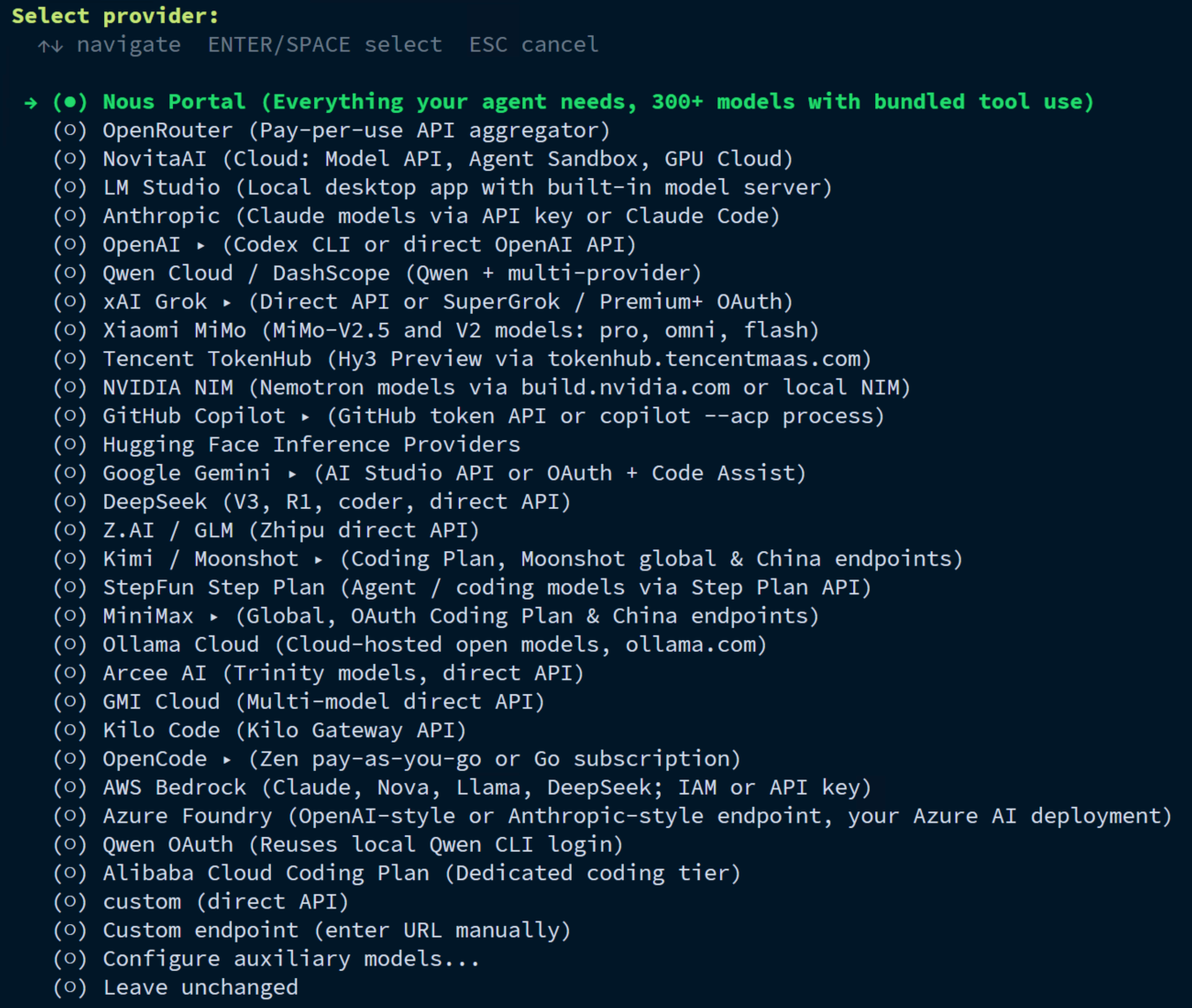
The CLI presents this as the interactive path for choosing your inference provider and default model. For normal day to day changes, it is the safest option because it keeps you out of the config files unless you really need to touch them.
Use hermes setup --portal for the fastest Nous path
If you want the shortest route into a working setup with Nous, use:
hermes setup --portal
That flow logs you in, sets Nous as your provider, and enables the Tool Gateway in one pass. It is the simplest option when you want a working setup without juggling separate API keys right away.
Use hermes config set when you already know the exact value
This is the direct option. Use it when you want to set one known value without stepping through the picker again.
For example, the docs show direct model and API key changes like these:
hermes config set model anthropic/claude-opus-4.6
hermes config set OPENROUTER_API_KEY sk-or-...
This is fast, but it is also easier to mistype something here than in the interactive picker. I use it when I know the exact value I want and do not need the CLI walking me through it.
Know where Hermes stores the important bits
Before you change anything, it helps to know where Hermes writes normal settings and where it keeps secrets.
Print the config file path:
hermes config path
Print the environment file path:
hermes config env-path
On this system, those commands resolve to:
/root/.hermes/config.yaml
/root/.hermes/.env
Hermes stores non-secret settings in config.yaml and secrets such as provider tokens in .env. That split makes later cleanup much easier and lowers the chance that you paste a token into the wrong place, a screenshot, or a Git repo.
Choose the provider style before you choose the model
The provider list is broad now, so the first useful question is not "which model looks best?" It is "what kind of setup do I actually want to maintain?"
Hosted API providers
This is the easiest category for most people. Hermes supports a long provider list through the model picker, including mainstream hosted APIs and routers such as:
OpenRouter
Anthropic
OpenAI
Google AI Studio
xAI
GitHub Copilot
Nous
If your goal is to get Hermes working quickly, pick one hosted provider, confirm the model, and test a real chat before you touch anything else.
Custom endpoints and self-hosted inference
Hermes also supports a custom endpoint path for:
VLLM
SGLang
Ollama
other OpenAI-compatible APIs
This is the right route when you want Hermes talking to your own inference stack instead of a public hosted API.
One requirement matters more than it may look at first glance: Hermes Agent needs a model with at least 64,000 tokens of context for real multi-step agent work. If your local endpoint runs a smaller context window, Hermes may reject it, or it may behave badly long before the problem is obvious.
For local or self-hosted endpoints, verify these three things first:
the base URL is correct
the model name matches what the endpoint actually exposes
the context window is large enough for agent work
That short checklist saves a lot of time.
A clean hosted-provider workflow
If you are moving between hosted providers, do it in this order.
Step 1: Open the interactive picker
hermes model
Pick the provider you actually plan to keep for a while instead of hopping through every menu just because it is there.
Step 2: Add or replace the provider credential if needed
If the picker asks for a token, give Hermes the real credential there.
If you would rather set the token directly afterward, use the matching config key. For example, OpenRouter can be set like this:
hermes config set OPENROUTER_API_KEY sk-or-...
Hermes writes secrets to ~/.hermes/.env, which is much better than leaving them in shell history notes or random scratch files.
Step 3: Confirm the chosen model
If you already know the exact model string you want, you can set it directly:
hermes config set model anthropic/claude-opus-4.6
If you are not sure, let hermes model guide you instead. That is usually the cleaner choice for a first setup or a provider switch.
Step 4: Run one real chat
Do not stop after the config change. Make Hermes prove the setup works.
hermes chat -q "Say hello and tell me which model/provider you are using."
What you want here is an uneventful success: Hermes answers cleanly, does not complain about missing credentials, and does not stall because the provider path still needs more setup.
A clean self-hosted endpoint workflow
Use this path when you want Hermes talking to your own inference stack.
Step 1: Make sure the endpoint itself works first
Before you blame Hermes, confirm that your local model server or OpenAI-compatible gateway is reachable and serving the model you expect.
That might be Ollama on the same box, a separate VLLM host, or another OpenAI-compatible service. The point is the same. If the endpoint is already shaky before Hermes touches it, Hermes is not going to fix that for you.
Step 2: Use the custom-endpoint path in the picker
hermes model
Choose the custom-endpoint route and enter the base URL, model name, and any authentication details the endpoint expects.
If you are pairing Hermes with a local model runtime, keep your hardware expectations realistic. A model that technically starts is not always a model you will enjoy using as an agent.
Step 3: Check the context window before you commit
Hermes needs a minimum 64K context window for normal agent behavior. On local stacks, this is an easy place to get fooled because the endpoint may answer simple chats just fine while still being a poor fit for real tool-calling sessions.
If you are using Ollama or another local runtime, make sure the model is exposed with enough context before you call the setup done.
Step 4: Run the same real-chat test
hermes chat -q "Summarize the current directory in 3 bullets."
A real response here tells you a lot more than a saved config file does.
When to rerun full setup instead
Sometimes hermes model is not enough because you are changing more than the provider.
Use full setup again when you want to rework several layers at once, such as:
provider and model choices
tool defaults
Tool Gateway choices
the overall first-run experience after a messy initial setup
hermes setup
That is also a good reset path if your configuration drifted over time and you want Hermes to walk you through the big choices again instead of patching them one by one.
Common mistakes that waste the most time
Setting the model but forgetting the credential
A model string by itself is not enough.
If Hermes knows you want anthropic/claude-opus-4.6 but you never added the right provider credential, the chat test is where that mistake finally shows up.
Editing the wrong file by hand
Hermes keeps secrets and normal config in separate files for a reason.
secrets belong in
~/.hermes/.envnormal config belongs in
~/.hermes/config.yaml
If you do choose to edit by hand, keep that split intact.
Treating a tiny local context window like a production-ready agent model
This is a common self-hosted trap. A model can answer a small prompt and still be a poor Hermes backend if the context window is too small for multi-step work.
If the local path feels strange, check the context size before you start blaming skills, tools, or the scheduler.
Adding gateways or cron before a normal chat works
If Hermes cannot complete a normal chat yet, stop there and fix the model or provider layer first.
Once the base chat works, then move on to things like scheduled jobs, messaging, or more advanced tool setups.
A quick verification ladder after any provider change
Use this every time you swap models or providers:
hermes config path
hermes config env-path
hermes chat -q "Say hello and confirm you can respond normally."
hermes doctor
Running those in that order catches most bad switches quickly without turning the session into guesswork.
Where to go next
Once your provider and model are stable, the useful follow-up steps are pretty clear:
keep Install Hermes Agent on Linux and Complete Your First Setup nearby if you are rebuilding from scratch
pair local inference with How to Install Ollama on Ubuntu and Run Your First Local LLM
use How to Install Open WebUI with Docker Compose if you want a browser front end for local models
move next into a Hermes scheduled-jobs or troubleshooting workflow once the base chat path is solid
Get the provider layer boring first. That is not glamorous, but it makes everything after it much easier.
Frequently Asked Questions
What is the easiest way to switch providers in Hermes Agent?
Where does Hermes Agent store API keys and model settings?
Can I use Hermes Agent with a self-hosted model endpoint?
Was this article helpful?
Let me know so I can keep improving.